System & Utilities
AIM Toolkit
A Windows utility for creating fast RAM disks and mounting image files as virtual drives or folders.
Our editorial review
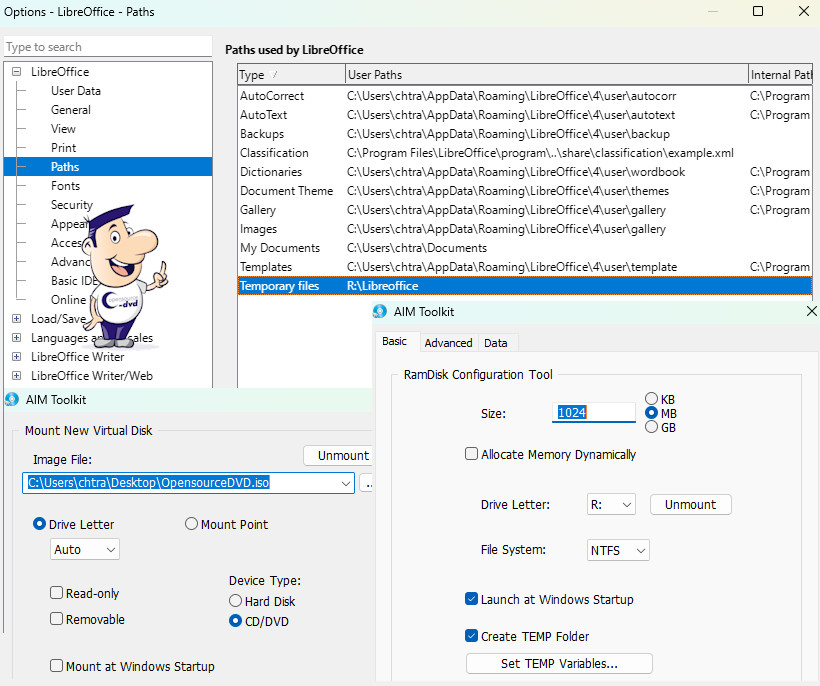
AIM Toolkit can create RAM disks and mount image files as virtual drives. A RAM disk uses part of the computer's memory as an extremely fast temporary drive. The allocated memory can be static or dynamic; in dynamic mode only the amount currently required is actually occupied.
The RAM-disk configurator lets the user choose the drive size, drive letter and file system and can recreate the disk automatically when Windows starts. The toolkit is therefore useful both for experiments with very fast temporary storage and for users who regularly work with disk images and virtual drives.
Why we recommend it
We recommend AIM Toolkit because it combines two useful advanced tasks in one open source package: RAM-disk creation and flexible image mounting. It is particularly interesting for users who understand why temporary high-speed storage or virtual images can improve a workflow.
Strengths
- Creates configurable RAM disks
- Mounts several common disk-image formats
- Supports virtual disks, optical-drive style mounts and mount points
- Useful context-menu integration
Things to consider
A RAM disk is volatile: its contents normally disappear when power is lost or Windows restarts unless data is deliberately saved elsewhere. Users should never place irreplaceable files only on a RAM disk.
Reviewed by Christian Trabi / OpenSource-DVD
Tested version: 20260420
Test platform: Windows 11, 64-bit
Last reviewed: November 2026
DIRECT DOWNLOAD
Download AIM Toolkit 20260420
Download the Windows version directly from the OpenSource-DVD.org server.
SOURCE CODE
Download AIM Toolkit source code
Download the source archive for this open source project.
Project information
Visit the official project page for documentation, release notes and additional project information.