System & Utilities
CrystalDiskInfo
A drive-health monitor that makes S.M.A.R.T. information from hard drives and SSDs easier to understand.
Our editorial review
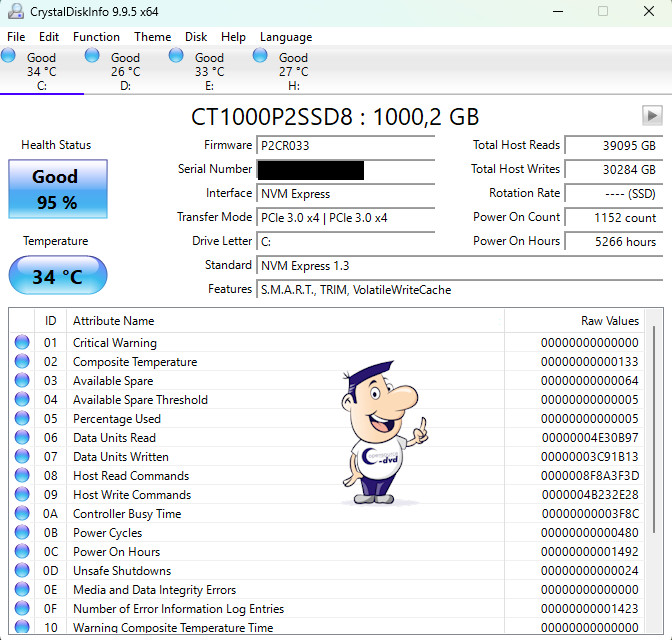
Many hard drives and SSDs use S.M.A.R.T. monitoring to record health information that can point to developing problems. CrystalDiskInfo reads these values and presents them in a much more accessible form, making it easier to spot warning signs before a drive fails completely.
Alongside health indicators, the program shows details such as firmware version, interface, transfer mode, power-on count, operating hours and temperature. CrystalDiskInfo cannot guarantee that a drive will not fail, but it is a useful early-warning tool and one we consider worth keeping on any Windows system where important data is stored locally.
Why we recommend it
We recommend it because storage problems can become data-loss problems. CrystalDiskInfo gives ordinary users visibility into information that would otherwise remain hidden and can help identify warning signs worth investigating.
Strengths
- Clear overview of S.M.A.R.T. information
- Temperature monitoring
- Useful health indicators
- Lightweight and focused
Things to consider
No S.M.A.R.T. utility can predict every drive failure. A healthy-looking drive can still fail unexpectedly, so the program must never be treated as a replacement for backups.
Reviewed by Christian Trabi / OpenSource-DVD
Tested version: 9.9.3
Test platform: Windows 11, 64-bit
Last reviewed: November 2026
DIRECT DOWNLOAD
Download CrystalDiskInfo 9.9.3
Download the Windows version directly from the OpenSource-DVD.org server.
SOURCE CODE
Download CrystalDiskInfo source code
Download the source archive for this open source project.
Project information
Visit the official project page for documentation, release notes and additional project information.