Audio & Video
Kodi
A media-centre application for organising and enjoying personal video, music and other media collections.
Our editorial review
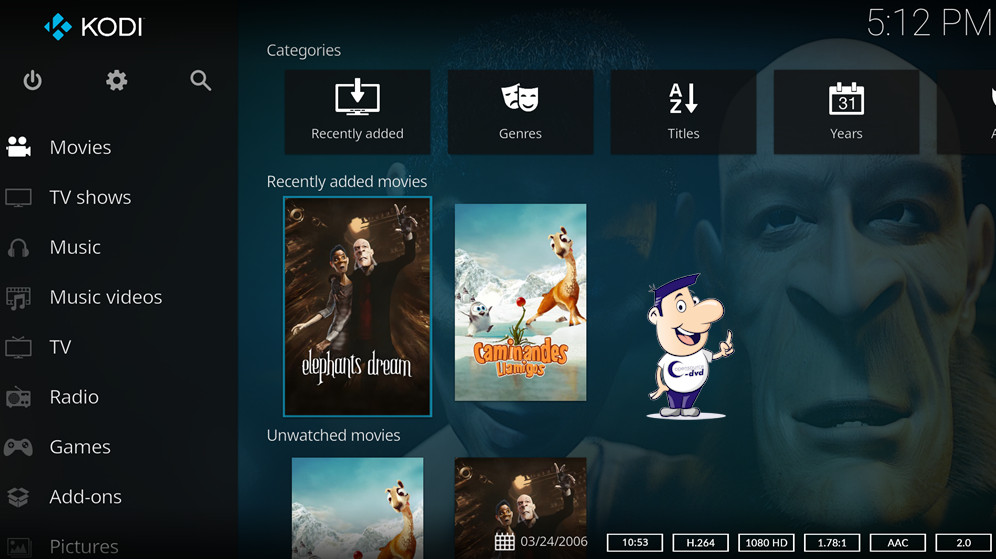
Kodi, originally known as XBMC, turns a Windows PC into a media centre for video, DVD, Blu-ray, music, slideshows, radio, television and internet streaming. It supports a wide range of media formats and codecs and lets the user define where local video, picture and music collections are stored.
Online sources such as internet radio, podcasts, RSS feeds and video streams can be added as well. Kodi's interface is designed for browsing a media library rather than simply opening one file at a time, which makes it particularly attractive for a living-room PC or a computer connected to a television.
Why we recommend it
We recommend Kodi when the computer itself is intended to become an entertainment centre. It provides a more immersive library experience than a conventional desktop player and can be extensively customised.
Strengths
- TV-friendly interface
- Library organisation for personal media
- Network-media support
- Highly customisable through skins and add-ons
Things to consider
Add-ons vary widely in quality and legality, so users should obtain them from trustworthy sources and respect the rights associated with media content. Kodi is also heavier than a simple file player.
Reviewed by Christian Trabi / OpenSource-DVD
Tested version: 21.3
Test platform: Windows 11, 64-bit
Last reviewed: November 2026
DIRECT DOWNLOAD
Download Kodi 21.3
Download the Windows version directly from the OpenSource-DVD.org server.
SOURCE CODE
Download Kodi source code
Download the source archive for this open source project.
Project information
Visit the official project page for documentation, release notes and additional project information.