Desktop & Windows
Open-Shell Menu
A customisable classic-style Start menu for Windows users who prefer a more traditional desktop workflow.
Our editorial review
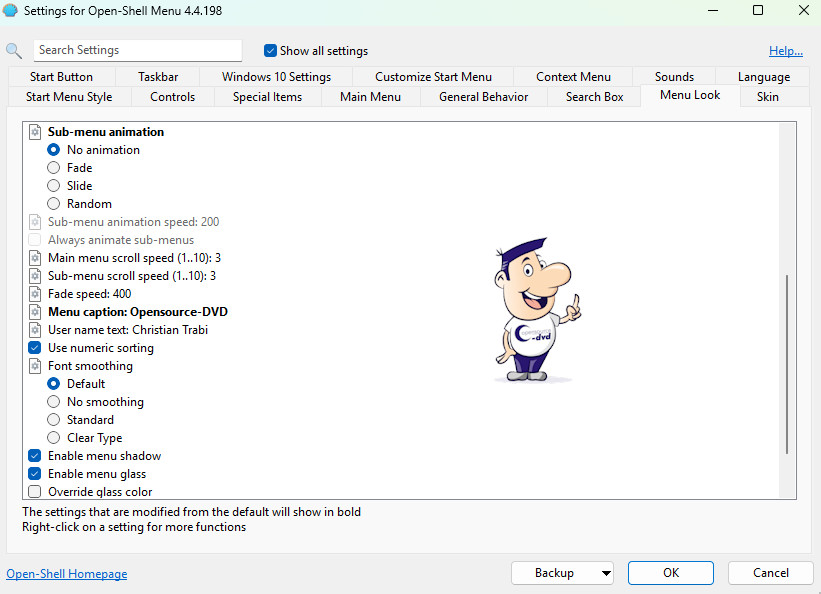
Open-Shell Menu is aimed at users who prefer the classic, compact Start menus of earlier Windows versions. After installation, the Start menu style can be changed from the program's settings, and the appearance of the Start button itself can also be replaced.
Beyond the basic choice of menu style, numerous details can be adjusted so the Start menu behaves more like the layout a user is accustomed to. We recommend Open-Shell primarily to people who find the standard Windows Start experience unnecessarily cumbersome and would rather have a traditional menu with direct access to programs and system locations.
Why we recommend it
We recommend it because interface preference matters. Users who work more efficiently with a compact, hierarchical Start menu can restore that style without changing the operating system itself.
Strengths
- Several classic Start-menu layouts
- Extensive customisation
- Original Windows Start menu remains accessible
- Useful on Windows 10 and 11
Things to consider
Because it integrates closely with the Windows shell, major Windows updates can occasionally require compatibility updates. Users who are happy with the standard Start menu gain little from installing it.
Reviewed by Christian Trabi / OpenSource-DVD
Tested version: 4.4.198
Test platform: Windows 11, 64-bit
Last reviewed: November 2026
DIRECT DOWNLOAD
Download Open-Shell Menu 4.4.198
Download the Windows version directly from the OpenSource-DVD.org server.
SOURCE CODE
Download Open-Shell Menu source code
Download the source archive for this open source project.
Project information
Visit the official project page for documentation, release notes and additional project information.